UGREEN Revodok USB-C Hub with 4K HDMI, 100W PD, 5 Ports Review 2026: Is it Worth It?
Quick Analysis Verdict
"Ideal for USB-C laptops needing HDMI output and 100W pass-through in a compact, portable hub; not ideal if you require Ethernet, SD card slots, or high-refresh 4K Hz output beyond 30Hz."
Review Methodology
Why this analysis may help before you buy
Rating signal
We weigh star rating together with 32,094 visible reviews so a rating is not judged in isolation.
Buyer momentum
Recent purchase activity and category badges help us identify products shoppers are actively considering.
RefreshBuy score
The score combines performance, quality, value, and ease-of-use signals for this category.
Decision Guide
Is UGREEN Revodok USB-C Hub with 4K HDMI, 100W PD, 5 Ports a good fit for you?
For shoppers comparing Computers & Accessories products, this UGREEN option looks strongest on ease of use with a 9.0/10 signal. The main area to double-check is performance, especially if that is your top priority.
Portable, single-connector expansion for USB-C laptops that need HDMI display, USB peripherals, and laptop charging on the go.
very broad review coverage, 4.5/5 rating, and 1,000+ recent monthly purchases.
Value score 7.0/10 at $24.99 current tracked price.
Choose it if
You want a Computers & Accessories pick where the strongest measurable signal is ease of use and the current review base is large enough to compare with alternatives.
Compare alternatives if
Your buying decision depends mostly on performance, long-term durability, or a lower final checkout price after marketplace changes.
Before buying
Check both Amazon Canada and Amazon US from this detail page, then compare similar Computers & Accessories products below before deciding.
Portable, single-connector expansion for USB-C laptops that need HDMI display, USB peripherals, and laptop charging on the go.
Great Value
Durable aluminum enclosure with ongoing user reports of solid reliability; expect several years of daily use with proper care.
Key Buying Points
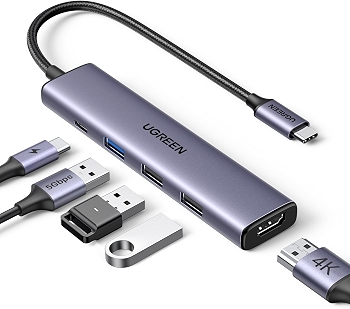
4K HDMI output via the USB-C hub provides high-detail display output (note: HDMI port supports 4K at 30Hz and requires host video output support).
100W USB-C Power Delivery pass-through enables laptop charging while the hub is in use, reducing tethering clutter.
5-in-1 design includes one USB-C data port (up to 5 Gbps) and two USB-A ports (2.0) plus a USB-A 3.0 data port for fast peripheral connectivity.
Lightweight aluminum chassis (~58g) combines durability with portability for travel and on-the-go work.
Plug-and-play, driver-free operation across a wide range of devices, including MacBook Pro/Air, iPad Pro, Surface, XPS, and ThinkPad.
Solid compatibility with common peripherals (keyboard, mouse, external HDD) and easy integration into existing setups.
Compact footprint makes it a practical add-on for laptops with limited ports, especially for remote work or classroom use.
The Catch
No Ethernet port is included, which may be a deal-breaker for users who rely on wired network stability.
HDMI output is limited to up to 4K@30Hz in most scenarios, which may be insufficient for high-refresh-rate gaming or professional video workflows.
Some USB-C chargers/PD adapters may not negotiate properly with certain hosts, leading to inconsistent charging performance.
There is no built-in SD/MicroSD card reader, so card transfers require alternate adapters or devices.
Avoid unplugging the PD charger during data transfers to prevent potential data loss or transfer interruptions.
Performance Scorecard
Common Questions & Expert Insights
Q: Does this hub have an Ethernet port for wired networking? ▼
Q: Will the HDMI output support 4K at 60Hz on my device? ▼
Q: Is this compatible with a MacBook Pro and USB-C chargers I already own? ▼
Q: Can I use SD or MicroSD cards with this hub? ▼
Q: How easy is maintenance or cleaning for this hub? ▼
Q: How does this compare to a full-docked solution? ▼
Q: Will this hub overheat under heavy use? ▼
Q: Can I use any USB-C charger for PD pass-through? ▼
Q: Is it suitable for travel and remote work setups? ▼
Q: How does it differ from a built-in USB-C hub on some laptops? ▼
You May Also Like
Top-rated alternatives in Computers & Accessories

 Save 40%
Samsung LS27F320GANXZA 27-Inch IPS FHD 120Hz Monitor with Game Mode
 Save 40%
 Save 29%
Samsung 9100 PRO 1TB PCIe 5.0 x4 NVMe M.2 SSD - Thermal Control
 Save 23%
TP-Link RE550 AC1900 WiFi Extender - Wide Coverage, 2.8k Sq Ft, 35 Devices
 Save 26%
Logitech Brio 101 Full HD 1080p Webcam with Privacy Shutter

Logitech MK270 Wireless Keyboard and Mouse Combo – Long Battery Life, Quiet Typing
 Save 32%